Content
You can use translation when you find a word or sentence that you don't fully understand. It works just like the 'Select Area to Read' tool where you can select the text you want to translate.
Try it for yourself:
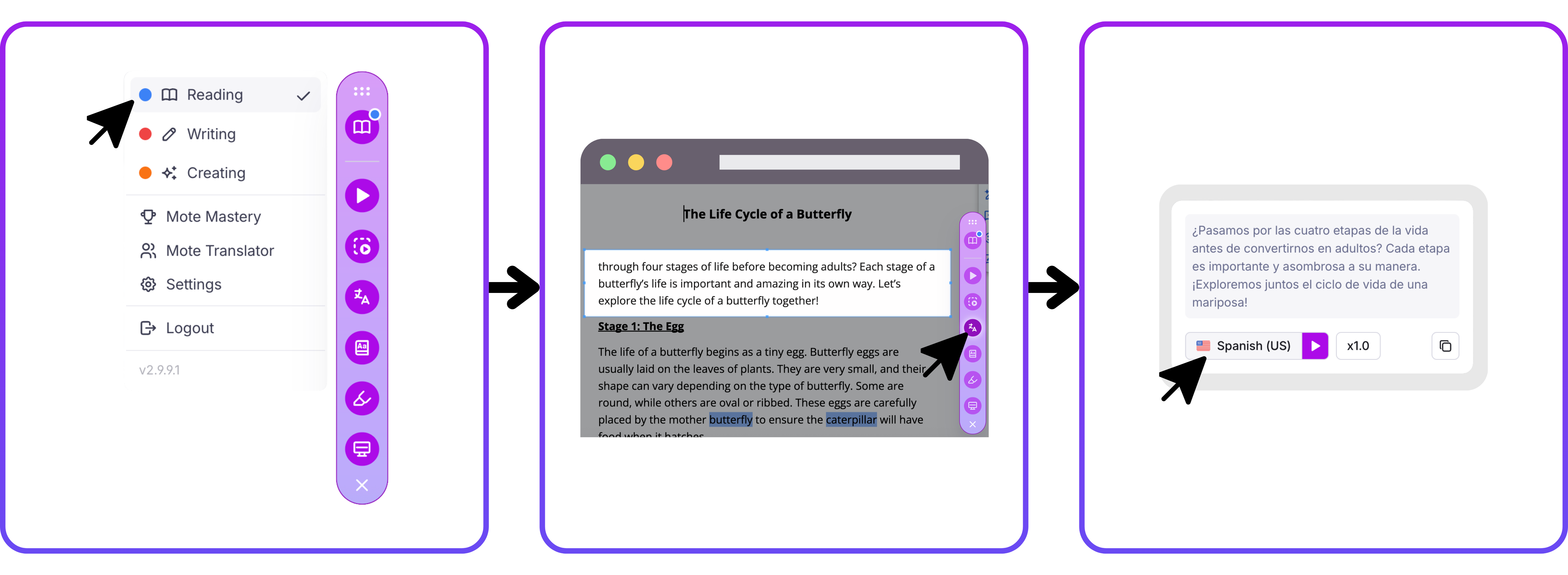
1️⃣ Step 1: Navigate to Reading Mode
Click on the top icon of the sidebar to open Reading Mode. You will know you are in Reading Mode if the book icon is showing.
2️⃣ Step 2: Select text to translate
Now you're in Reading Mode, you have two options for selecting the text you want to translate:
- Highlight the text you want to translate, then click the Translate button on the sidebar.
- OR click the Translate button first, then drag and select over the text you want to translate.
3️⃣ Step 3: Select your language
Now that you have selected the text you want translated, click the flag icon to choose your preferred language. You will only need to do this once—Mote will remember your choice next time you want to translate.