Content
You can use the dictionary tool for new words that you don't know. Every time you use the dictionary to get the definition for a word, you can save it to your vocabulary list to review later!
Lets try it right here:
1️⃣ Step 1: Navigate to Reading Mode
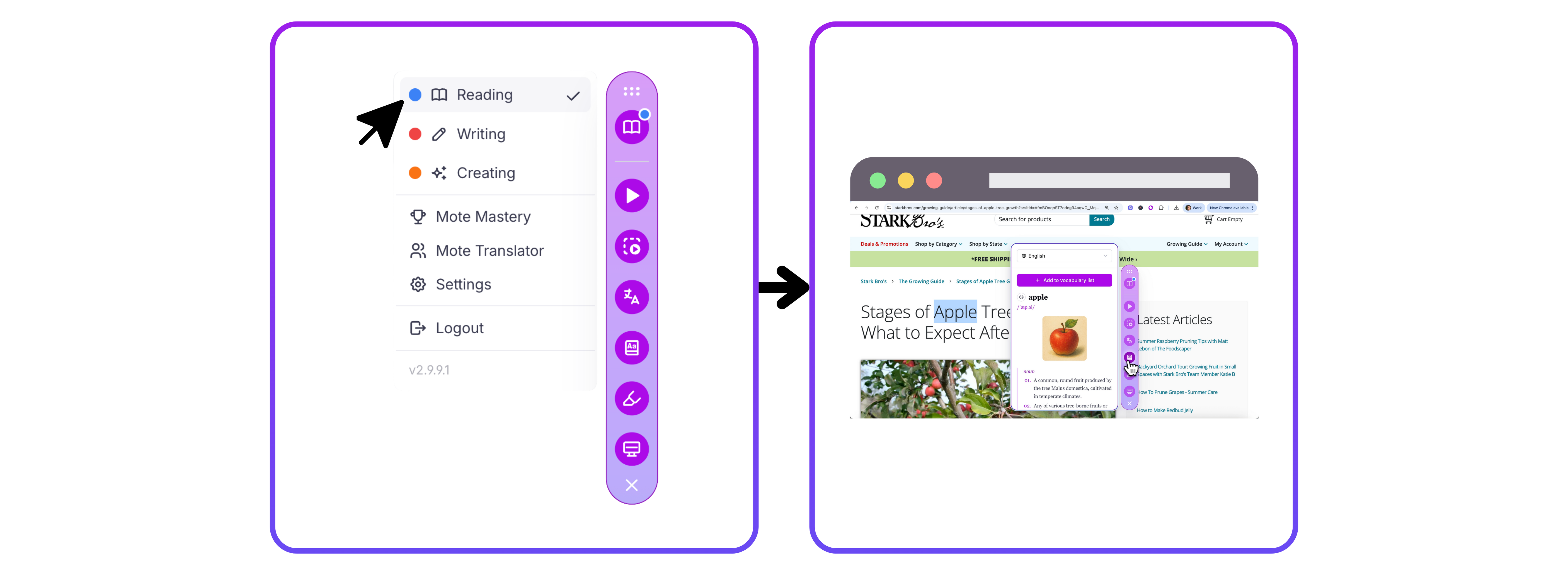
Click the top icon in the Mote sidebar to open Reading Mode. You will know you are in Reading Mode when the book icon is visible.
2️⃣ Step 2: Activate Dictionary
Now you're in Reading Mode, you can either highlight a word first and then click the dictionary icon, or click the dictionary icon first and then select your word. Both methods work the same way!
3️⃣ Step 3: Add to vocabulary list
After finding the definition for your word, click Add to vocabulary list to save it. This automatically stores your definition in your vocabulary list within Mote Mastery.
If English isn't your first language, you can click the dropdown to change the language!
*We'll show you how to get to Mote Mastery later in this course!